Monday, January 11, 2016

SiteManager Report Server is currently offline

SiteManager Report Server is currently offline. We have placed a remedy ticket in with NTTData. We will send another notice when the issue with the server is resolved.


Thank you

----------------------------------

Active Server Pages error 'ASP 0113'

Script timed out

/org/cst/smrptsvr/home.asp

The maximum amount of time for a script to execute was exceeded. You can change this limit by specifying a new value for the property Server.ScriptTimeout or by changing the value in the IIS administration tools.


----------------------------------


STEWART DEWITT | SENIOR SITEMANAGER SUCCOR™ | TxDOT | 512.416.2462 |stewart.dewitt@txdot.gov


Ho-Ho-Oh No! - Drink. Drive. Go to Jail.

Friday, December 4, 2015

SiteManager Outage Sunday for Production Maintenance Schedule: Oracle 11.2.0.4 Upgrade - Non-ERP

SITEMANAGER , EPRS & LIMS offline Sunday , December 6th


The SiteManager , EPRS, and LIMS applications will be unavailable this Sunday, December 6th  between the hours of 7:00AM and 8:00PM (Central) for a Oracle upgrade.


The scheduled maintenance will take approximately 13 hours and it will impact SiteManager Non-Inspector, SiteManager Terminal & Citrix Servers, SiteManager ADHOC Custom Report Server, CMISD reports, EPRS and LIMS.

Please pass along this information to all TxDOT and contracted employees that may be impacted by this outage.


Subject: Reminder: Production Maintenance Schedule: Oracle 11.2.0.4 Upgrade - Non-ERP


This is a reminder of the non-ERP production application outage scheduled this weekend.


CAB date is Dec 3rd


There is a meetings scheduled Dec 2nd at 2:00 PM with David Sellar.


Date: December 6th

Start Time: 07:00 AM - 08:00 PM

Duration: 13 hrs


App and Streams shutdown: 07:00 AM - 08:00 AM

Update: 08:00 AM - 06:00 PM

App startup and verification: 06:00 PM - 08:00 PM


TXDOT-AAV-DBAX01

TXDB3, TXDB15


Production applications: Electronic Letting System (ELS), PEGA, Compass, Facility Management System (FMS), SiteManager ADHOC Reporting, Electronic Project Records System (EPRS), E1391 (FHWA)


TXDOT-AAV-DBAX02

TXDB4, TXDB10


Production applications: Environmental Compliance Oversight System (ECOS), MBITS (Bridge Division), Pontis (Bridge Division), Bridge Shop Plans, Bridge Log, All COMMON Mainframe replicated data  (COMMON_CNSTR, COMMON_DSGN, COMMON_TACS), ER_FINANCES, Texas Airport Data System (TADS), E1391, Bridge Management Contract System (BCMS), GIS applications (ROW,  AOTS, Recycle, Regulatory, Railroad, TxDOT_OTS_ADMIN, TxDOT_PLANNING, TXDOT_ROUTE etc…), Decision Support System (DSS)


Training application: Compass, Facility Management System (FMS)


TXDOT-AAV-DBAX03

TXDB2, TXDB23


Production applications: SiteManager, Laboratory Information Management (LIMS)


Production Support: SiteManager, Electronic Project Records System (EPRS), E1391

#EndTheStreak

Monday, November 30, 2015

TxDOT SiteManager Citrix access is moving

TxDOT SiteManager Citrix access is moving


Greeting,


We are moving our SiteManager Citrix access over to mycitrix.txdot.gov. Bookmark this link in your browser’s favorites.


Beginning today Monday, November 30th SiteManager users accessing SiteManager via Citrix should transition over to the Citrix XenApp environment found at this mycitrix.txdot.gov link.

This transition to the Citrix XenApp platform should significantly improve the performance of SiteManager as well as its reliability. Instructions for navigating the new XenApp portal can be found on the CMISD /SiteManager webpage under the MTS/Citrix section or by following this link http://crossroads/org/cst/cmisd/docs/SiteMgr/XenAppCI.pdf.


Are you receiving a blank black screen of nothing when clicking on the new Citrix portal link? Internet Explorer users should be certain their browser’s compatibility setting is turned on for this website. Learn more here.


DISCONTINUED:

Access to SiteManager via the old Citrix MetaFrame gateway at http://txdotsg.dot.state.tx.us will be discontinued mid December 2015.


Questions or technical issues can be forwarded to CST_SiteManager@txdot.gov.


Another copy of this email will be sent directly to SiteManager Citrix account holders.


Thank you


STEWART DEWITT | SENIOR SITEMANAGER SUCCOR™ | TxDOT | 512.416.2462 |stewart.dewitt@txdot.gov


#EndTheStreak

Friday, October 9, 2015

SITEMANAGER , EPRS & LIMS offline Sunday October 11th

Greetings,

The SiteManager , EPRS, and LIMS applications will be unavailable this Sunday, October 11th between the hours of 7:00AM and 6:00PM (Central) for a server OS upgrade.


The scheduled maintenance will take approximately 11 hours and it will impact SiteManager Non-Inspector, SiteManager Terminal & Citrix Servers, SiteManager ADHOC Custom Report Server, CMISD reports, EPRS and LIMS.


Please pass along this information to all TxDOT and contracted employees that may be impacted by this outage.


Sent: Thursday, October 08, 2015 7:11 AM
Subject: Testing this weekend - Server OS Upgrade - DB Server


Date: October 11th

Start Time: 07:00 AM - 06:00 PM

Duration: 11 hrs


App and Streams shutdown: 07:00 AM - 08:00 AM

Update: 08:00 AM - 04:00 PM

App startup and verification: 04:00 PM - 06:00 PM


TXDOT-AAV-DBAX01

TXDB3, TXDB15


Production applications: Electronic Letting System (ELS), PEGA, Compass, Facility Management System (FMS), SiteManager ADHOC Reporting, Electronic Project Records System (EPRS), E1391 (FHWA)


TXDOT-AAV-DBAX02

TXDB4, TXDB10


Production applications: Environmental Compliance Oversight System (ECOS), MBITS (Bridge Division), Pontis (Bridge Division), Bridge Shop Plans, Bridge Log, All COMMON Mainframe replicated data  (COMMON_CNSTR, COMMON_DSGN, COMMON_TACS), ER_FINANCES, Texas Airport Data System (TADS), E1391, Bridge Management Contract System (BCMS), GIS applications (ROW,  AOTS, Recycle, Regulatory, Railroad, TxDOT_OTS_ADMIN, TxDOT_PLANNING, TXDOT_ROUTE etc…), Decision Support System (DSS)


Training application: Compass, Facility Management System (FMS)


TXDOT-AAV-DBAX03

TXDB2, TXDB23


Production applications: SiteManager, Laboratory Information Management (LIMS)


Production Support: SiteManager, Electronic Project Records System (EPRS), E1391


______________________________________________________________________
Disclaimer: This email and any attachments are sent in strictest confidence
for the sole use of the addressee and may contain legally privileged,
confidential, and proprietary data. If you are not the intended recipient,
please advise the sender by replying promptly to this email and then delete
and destroy this email and any attachments without any further use, copying
or forwarding.

Talk. Text. Crash.

Talk. Text. Crash.

Tuesday, September 15, 2015

(FIXED) SiteManager Citrix is offline

The SiteManager Citrix servers are available.


From: CST_SITEMANAGER
Sent: Tuesday, September 15, 2015 8:58 AM
Subject: SiteManager Citrix is offline


The SiteManager Citrix servers are offline this morning. IT is working to resolve the issue. We will send a follow-up message once the servers are available.


Thank you


STEWART DEWITT | SENIOR SITEMANAGER SUCCOR™ | TxDOT | 512.416.2462 |stewart.dewitt@txdot.gov


Talk. Text. Crash.

Talk. Text. Crash.

SiteManager Citrix is offline


The SiteManager Citrix servers are offline this morning. IT is working to resolve the issue. We will send a follow-up message once the servers are available.


Thank you


STEWART DEWITT | SENIOR SITEMANAGER SUCCOR™ | TxDOT | 512.416.2462 |stewart.dewitt@txdot.gov


Talk. Text. Crash.

Talk. Text. Crash.

Friday, September 11, 2015

RE: (FIXED) SiteManager Citrix is offline

The SiteManager Citrix servers are now available.


From: CST_SITEMANAGER
Sent: Friday, September 11, 2015 9:54 AM
Subject: SiteManager Citrix is offline


As you may know, the SiteManager Citrix servers are offline this morning. IT is working to resolve the issue. We will send a follow-up message once the servers are available.


Thank you


STEWART DEWITT | SENIOR SITEMANAGER SUCCOR™ | TxDOT | 512.416.2462 |stewart.dewitt@txdot.gov


Talk. Text. Crash.

Talk. Text. Crash.

SiteManager Citrix is offline

As you may know, the SiteManager Citrix servers are offline this morning. IT is working to resolve the issue. We will send a follow-up message once the servers are available.


Thank you


STEWART DEWITT | SENIOR SITEMANAGER SUCCOR™ | TxDOT | 512.416.2462 |stewart.dewitt@txdot.gov


Talk. Text. Crash.

Talk. Text. Crash.

Wednesday, August 12, 2015

SiteManager update this weekend August 14th

SiteManager Update This Weekend

SiteManager 3.8a tx2.014 scheduled for distribution the weekend of Friday, August 14th.

 Greeting,

On Friday, August 14, 2015 IT will begin the process of updating your SiteManager application to the latest release. The new version (3.8a tx 2.014) will be made available for install through LANDesk. The upgrade process will begin at 6 PM on Friday and will proceed through Saturday and Sunday (all times central). The SiteManager application via the Citrix and MTS servers and the client Non-Inspector versions will be unavailable for the duration. SiteManager reporting will be offline until Monday, August 17th at 6 AM when SiteManager is scheduled to be back online.

No SiteManager access from 6 PM Friday the 14th until 6:00 AM Monday the 17th.

·           Please make every attempt to keep all SiteManager PC's powered on during this period. Log out of any SiteManager workstations or keep the SiteManager application closed while not in use this weekend.

·           Laptops with a local installation of SiteManager (a.k.a. Non- Inspector) must be on the network this weekend to receive the update.

·           Workstations and laptops that use Citrix and Terminal Servers connections exclusively do not have to be on the network to receive the update.

·           It is mandatory that standalone users check in all work prior to 6:00 PM Friday, August 14th.

·           SiteManager access to reports and reporting tools will not be available.

·           Citrix and Terminal server SiteManager access will not be available.

·           Remember – When users open SiteManager Non-Inspector for the first time on Monday, August 17th, after the upgrade, the user ID field on the logon screen will be blank. SiteManager user ID’s are case sensitive and 99.99% of these ID’s are all upper case characters.

How to do determine if your computer received the update?

On Monday, August 17th open SiteManager and from the menu choose Help and then About ( HELP>>ABOUT) . Read the number beneath 3.8a TXDOT 2.014 version. This number will read (20150810) if your device is up to date.

Figure 1


Missed the update?

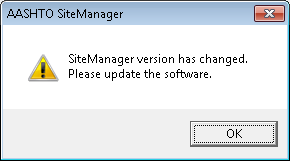
You will know immediately Monday upon trying to login to SiteManager if your device was not updated. SiteManager will notify you that the version of the software has changed. See figure 2.

Figure 2

If your workstation or laptop is not on the network this weekend (see bulleted list above for recommendations) or for whatever reason the update is not installed come Monday, August 17th , you must request the update through TXDOTNOW. Your request should include your computer’s name and instructions to deploy the LANDesk package “AASHTOWare SiteManager 3.8a 2.014 - Install (7x64, 7x32)” to your device.


What to expect from the tx2.014 update?


DWR all windows

·           Equipment lists now sorts by equipment name.

Figure 3

DWR Calendar window

·           EQUIPMENT & PERSONNEL

o   Copy & Paste options now include remarks.

o   Copy & Paste options now include personnel and equipment counts.


Figure 4


·           PCBU60178 DISTRIBUTION

o   DWR distributions without a function will not tally at estimate generation. Missing functions will have to be corrected at the DWR. We recommend using the Item History Report-MMS report before generating an estimate.

Contract Materials window

·           The contract materials list now includes an option to view Construction and Maintenance contracts separately. Figure 5.

Figure 5

·           An option is now available to remove contracts with no material testing from the list.

·           A contract’s key date for material generation is now automatically populated with the material generation.

User Security window

·           New user accounts now require a Novell user ID, Employee ID, and email address. External non-TxDOT employees must include a TxDOT authorizer. Figure 6.

Figure 6

·           User account names can no longer be edited after the account is established. Figure 7.

Figure 7

Material Testing

·           Excel test files will download to your local device when using the Non-Inspector version (not valid for Citrix/ MTS). At startup SiteManager will query a file server to compare file versions saved locally on your device to those on the server. When a version discrepancy is discover an automatic update will download the latest file. See figure 8 below for an illustration. This pop-up will appear, in the upper left part of the screen, as it cycles through the available Excel files to indicate the status of the update.

Figure 8

·           The Excel test file directory x:\SMGR\sm3x\msexceltemplates will eventually be withdrawn.

Attachments Viewer

Figure 9

New with this release is an attachments viewer that allows for the quick searching of system attachments of all types. See figure 9 for navigation and figure 10 for a screen shot view of the tool. This “in-the-application” tool is a replacement for the Attachment View program available from the Additional Apps button of the SiteManager Citrix and Terminal Servers launch pad. You may visit our website’s front page to view a short video demonstration of the new viewer in action.

Figure 10


STEWART DEWITT | SENIOR SITEMANAGER SUCCOR™ | TxDOT | 512.416.2462 |stewart.dewitt@txdot.gov


Talk. Text. Crash.

Talk. Text. Crash.

Wednesday, August 5, 2015

SiteManager Custom Report Server is back online

The SiteManager Custom Report server is again processing reports. Previously requested reports should soon be available. There are from today approximately 250 queued reports that the servers are working through.


From IT ” …Report servers are currently working on report requests from yesterday afternoon.  Will take a while to catch up.”


From: CST_SITEMANAGER
Sent: Wednesday, August 05, 2015 8:52 AM
Subject: SiteManager Custom Report Server is offline


The SiteManager Custom Report Server is currently not returning reports. An incident ticket with IT has been issued.


The server is logging requests, but is not processing them. We will have additional information for you as it becomes available.


Thank you,


STEWART DEWITT | SENIOR SITEMANAGER SUCCOR™ | TxDOT | 512.416.2462 |stewart.dewitt@txdot.gov


Talk. Text. Crash.

Talk. Text. Crash.

SiteManager Custom Report Server is offline

The SiteManager Custom Report Server is currently not returning reports. An incident ticket with IT has been issued.


The server is logging requests, but is not processing them. We will have additional information for you as it becomes available.


Thank you,


STEWART DEWITT | SENIOR SITEMANAGER SUCCOR™ | TxDOT | 512.416.2462 |stewart.dewitt@txdot.gov


Talk. Text. Crash.

Talk. Text. Crash.

Thursday, July 23, 2015

SiteManager Password Reset

TXDOTNow has a new portal  for password resets. SiteManager is one of the options.


Choose

·         Something’s Broken

·         Password Reset

·         Application -SiteManager


A request sent earlier today through the website was reset in 14 minutes. Your time may vary.


STEWART DEWITT | SENIOR SITEMANAGER SUCCOR™ | TxDOT | 512.416.2462 |stewart.dewitt@txdot.gov


Talk. Text. Crash.

Talk. Text. Crash.